Partner with a neutral, independent MMP
AppVero measures app campaigns without selling media. Our integration docs are public, and every fraud decision carries a reason code your team can check.
Who it’s for
Ad networks
Send clicks and impressions through AppVero tracking links and receive install and event postbacks with the macros you need.
- Click & impression links
- Install and event postbacks
- Public fraud reason codes
Agencies
Run campaigns for app clients with neutral measurement, reports in their timezone and raw data in their own warehouse.
- Owned and paid media in one view
- Read-only API keys for reporting
- Raw data your clients own
Technology partners
Connect CDPs, BI tools, messaging and email platforms through webhooks, exports, the reporting API and S2S events.
- Signed real-time webhooks
- Hourly Parquet exports
- S2S events API
Measurement you can audit, from a company that isn’t selling ads
Neutral by design
AppVero doesn’t sell media or run campaigns, so it doesn’t compete with you for budget.
Public documentation
Tracking links, click-time parameters, postback macros and fraud codes are documented in the open.
Explainable decisions
Every rejected or flagged install carries a stable, public reason code — no black box.
Postbacks that arrive
Retried with exponential backoff for up to 24 hours on errors and timeouts, with per-partner rate limits.
Built for real journeys
Chat-app and in-app-browser links handled, localised link pages, and reporting in any of 30+ currencies.
Reconcilable data
Advertisers get raw rows with your click IDs, so discrepancies can be investigated row by row.
Three steps from first click to first postback
The full reference — parameters, macros, event mapping and a testing checklist — is in the integration guide.
- 1
Agree a media source ID
We agree an ID for your network — for example
examplenet_int. It identifies your traffic in links, reports, postbacks and raw data.media_sourceText examplenet_int - 2
Send clicks through AppVero links
Advertisers place an AppVero tracking link in your platform, filled with your macros: your click ID, and GAID / IDFA where the user allows it. Impression links work the same way for view-through.
Click tracking linkText https://northwind.appvero.link/c/app_7f3k9q2m?media_source=examplenet_int &campaign={campaign_name}&adset={adset_name}&ad={ad_name}&site_id={publisher_id} &click_id={your_click_id}&gaid={gaid}&idfa={idfa} - 3
Receive postbacks
Advertisers add your install and event postback templates, map their events to your names, run the testing checklist — and go live.
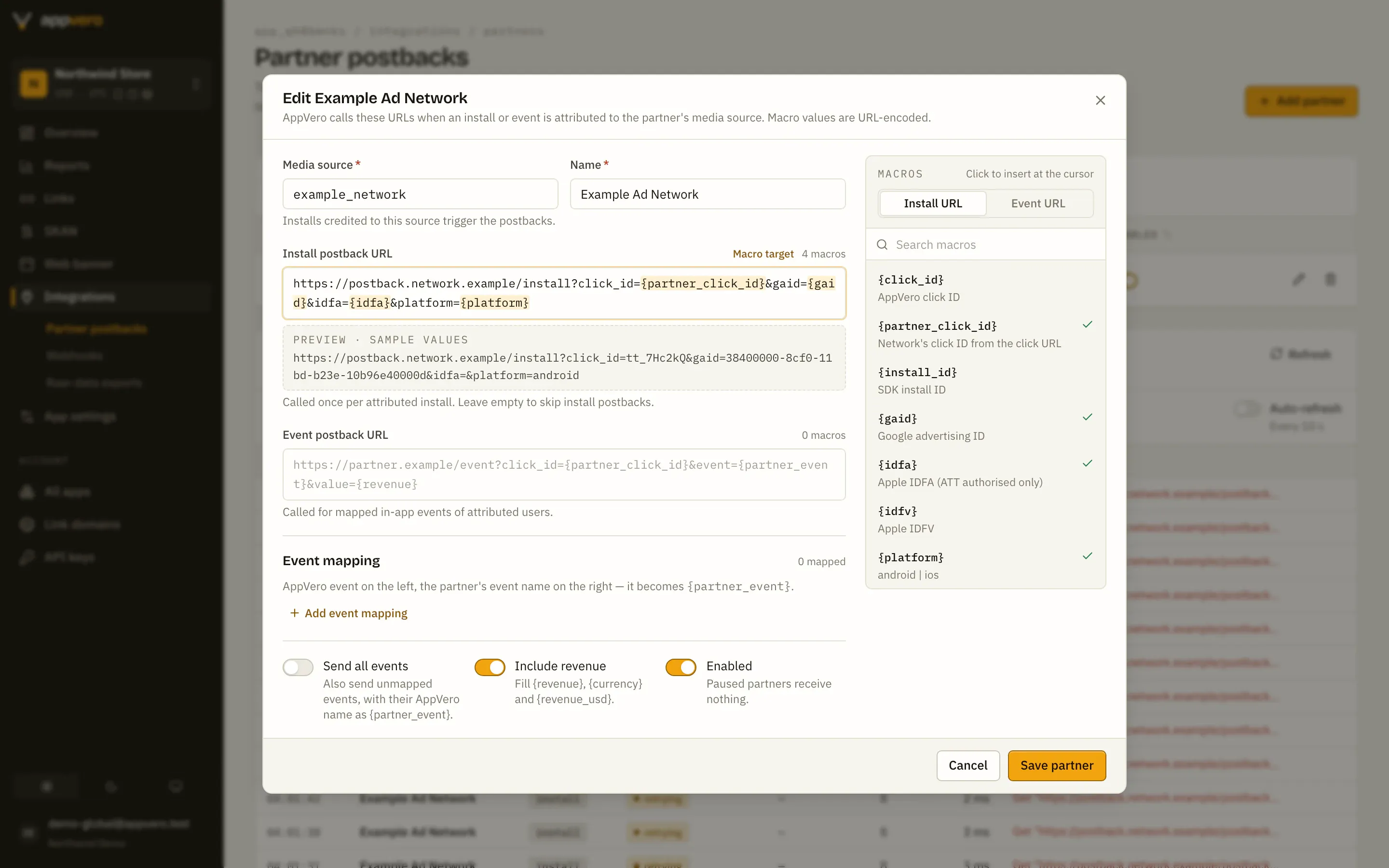
Install postback templateText https://postback.network.example/install?click_id={partner_click_id} &gaid={gaid}&idfa={idfa}&platform={platform}&country={country}&ts={install_ts_s}
Apply to partner
Tell us about your network, agency or product. We’ll come back with next steps and a test plan.
- 1
We review your application and reply from [email protected].
- 2
We agree your media source ID and the macros you need.
- 3
We test clicks, installs and postbacks together before launch.
Thanks — we’ve got it.
Our partnerships team will reply from [email protected] to the address you gave.
This form needs JavaScript. You can also email [email protected].
Is there a certification programme?
Not today. Integration is documented publicly and we work with each partner directly to test it end to end.
Which networks can advertisers send postbacks to?
Any network that accepts server-to-server URL postbacks. Advertisers add the partner’s install and event URL templates in AppVero, with macros such as {partner_click_id}, {gaid} and {revenue}.
Do you support view-through attribution?
Yes, through impression links (/i/
How are iOS installs without ATT consent handled?
Paid-media installs without consent are marked restricted and measured in aggregate through SKAdNetwork and AdAttributionKit. They are not attributed to a click and do not trigger install postbacks.